Guides
Amazon URL Shortener: Shorten Amazon Links & Send Buyers to the Right Country Store
Amazon product URLs are long, ugly, and — if you earn from Amazon's affiliate programme — surprisingly fragile. A raw link pasted into a YouTube description, a tweet, or an email signature wastes characters, breaks across lines, and quietly
By Urlzbit · · 11 min read
Amazon product URLs are long, ugly, and — if you earn from Amazon's affiliate programme — surprisingly fragile. A raw link pasted into a YouTube description, a tweet, or an email signature wastes characters, breaks across lines, and quietly hides whether it is carrying your tracking tag at all. And once your audience spans more than one country, a single amazon.com link starts leaking money: your UK or German viewers land on the US store, and your commission goes to zero.
This guide covers the three ways to shorten an Amazon link, the affiliate-policy rules that actually govern short links, the amzn.to vs a.co mistake that costs beginners real commissions, and how to serve one short link that sends each visitor to the right country's Amazon store — with the right affiliate tag attached.
The 3 ways to shorten an Amazon link
There are exactly three ways most affiliates shorten Amazon links. They are not equal.
Method 1: trim the URL by hand
An Amazon product URL contains an ASIN — the 10-character product code — buried inside a much longer address. You can delete everything except the product path and the ASIN, then keep your affiliate tracking parameter (the tag= value) intact. This works and costs nothing.
Pros: free, instant, no tools. Cons: manual, error-prone at scale, and you must remember to keep your tag parameter on every link. Drop the tag and the click earns nothing. You also get no click data, and you cannot change the destination later without editing every place the link appears.
Method 2: SiteStripe and amzn.to
When you are signed in as an Amazon Associate, SiteStripe (the toolbar at the top of Amazon pages) creates a short link for the product you are viewing. These short links use Amazon's amzn.to domain and include your tracking ID. This is the officially blessed way to shorten a single link.
Pros: free, carries your tag automatically, one click. Cons: no analytics beyond Amazon's own reports, one link at a time, and the destination is fixed to the store you were browsing — amzn.to has no answer for international traffic.
Method 3: a third-party shortener
Paste your tagged Amazon link into a URL shortener and get a short link you control: you can rename the ending, change the destination later, and see click analytics. The trade-off is policy compliance and, on some tools, cost.
Pros: custom endings, destination editing, click analytics by country and device, bulk creation for product lists. Cons: you are responsible for keeping every link policy-compliant (see the next two sections), and serious features like country routing are usually paid.
amzn.to vs a.co: the commission mistake
Amazon's own short links come in two flavours, and only one of them earns you commissions.
- amzn.to links are created through SiteStripe or Associates Central. They carry your tracking ID. These are the correct links for affiliates.
- a.co links are created by Amazon's share buttons (the "share" option inside the Amazon app and site). They are meant for personal sharing, not affiliates — they do not carry your tracking tag.
If you build a workflow around a.co links, you are sending your audience free traffic and earning nothing. Affiliates who have hit this report clicks in their reports with no tracked sales, and the fix was switching to tagged links (see this affiliate's debugging story). Always start from a link that contains your tag, and keep the tag through every shortening step.
Does Amazon allow third-party shorteners?
Yes — with two clear conditions. This is the part most guides get backwards, so here is what Amazon's own rules actually say.
The Amazon Associates Program Policies contain this clause, quoted verbatim:
> "You will not use a link shortening service, button, hyperlink or other ad placement in a manner that makes it unclear that you are linking to an Amazon Site."
Read that carefully. The prohibition is on making the destination unclear, not on shortening itself. A short link labelled "Check price on Amazon" is clear. A short link buried under "click here for my secret deal" is not. The tool is not the problem; the presentation is. (Source: verbatim policy quotes)
The clause everyone calls the "cloaking ban" reads:
> "You will not cloak, hide, spoof, or otherwise obscure the URL of your Site containing Special Links (including by use of Redirecting Links) or the user agent of the application in which Program Content is displayed or used such that we cannot reasonably determine the site or application from which a customer clicks through such Special Link to the Amazon Site."
This one is about your site, not Amazon's. Amazon needs to see which site or app the click came from. Redirect chains that strip the referrer so Amazon's logs show traffic arriving from nowhere are the violation — plain shortening that preserves the referrer is fine. That distinction is why dedicated Amazon tools like Geniuslink can state publicly that they are safe for Associates: they preserve referrer information. (See their compliance explanation)
Three practical compliance habits:
- Always label short links with the destination: "Buy on Amazon," "Check the price on Amazon," or equivalent wording near the link.
- Keep your required affiliate disclosure. Shortening does not shorten your disclosure obligations.
- Never stack shorteners on top of each other (your short link pointing to another short link pointing to Amazon). Chained redirects are exactly the kind of setup that can strip referrer data.
Policy note: Amazon's rules evolve. The quotes above were verified against secondary sources quoting the policies on 2026-10-22; check the current Associates Operating Agreement in Associates Central before relying on them for anything high-stakes.
The international problem: one link, many storefronts
Here is the money-leaking problem amzn.to cannot solve. A visitor from the UK who clicks your amazon.com affiliate link lands on the US store. Even if they buy, you earn nothing from that sale unless you are also registered in the UK programme — and each country's Associates programme is a separate registration with its own tracking ID. Your US tag does not earn on amazon.co.uk, and your UK tag does not earn on amazon.de.
If your audience is international — and on YouTube, TikTok, newsletters, and social platforms, it almost always is — a single-store link monetizes only the visitors from that store's country. The rest are free traffic for Amazon.
Why OneLink doesn't fix social and messaging links
Amazon's official answer to the international problem is OneLink, a script you add to your website that localizes Amazon links for international shoppers. It has real limits for anyone whose links live off their own website:
- OneLink is a website JavaScript snippet. It rewrites links on pages where the script is installed.
- It does not process third-party short links shared off-site — your tweets, YouTube descriptions, WhatsApp forwards, and newsletter links never touch your website's script, so they never get localized.
- Country coverage is limited, and it only works within Amazon's ecosystem.
If most of your clicks come from places where you cannot run JavaScript — social posts, video descriptions, emails, QR codes on printed material — OneLink never fires. You need the routing to happen on the link itself, server-side, before the visitor ever reaches Amazon.
Geo-routing with Urlzbit Pro: one short link, one destination per country
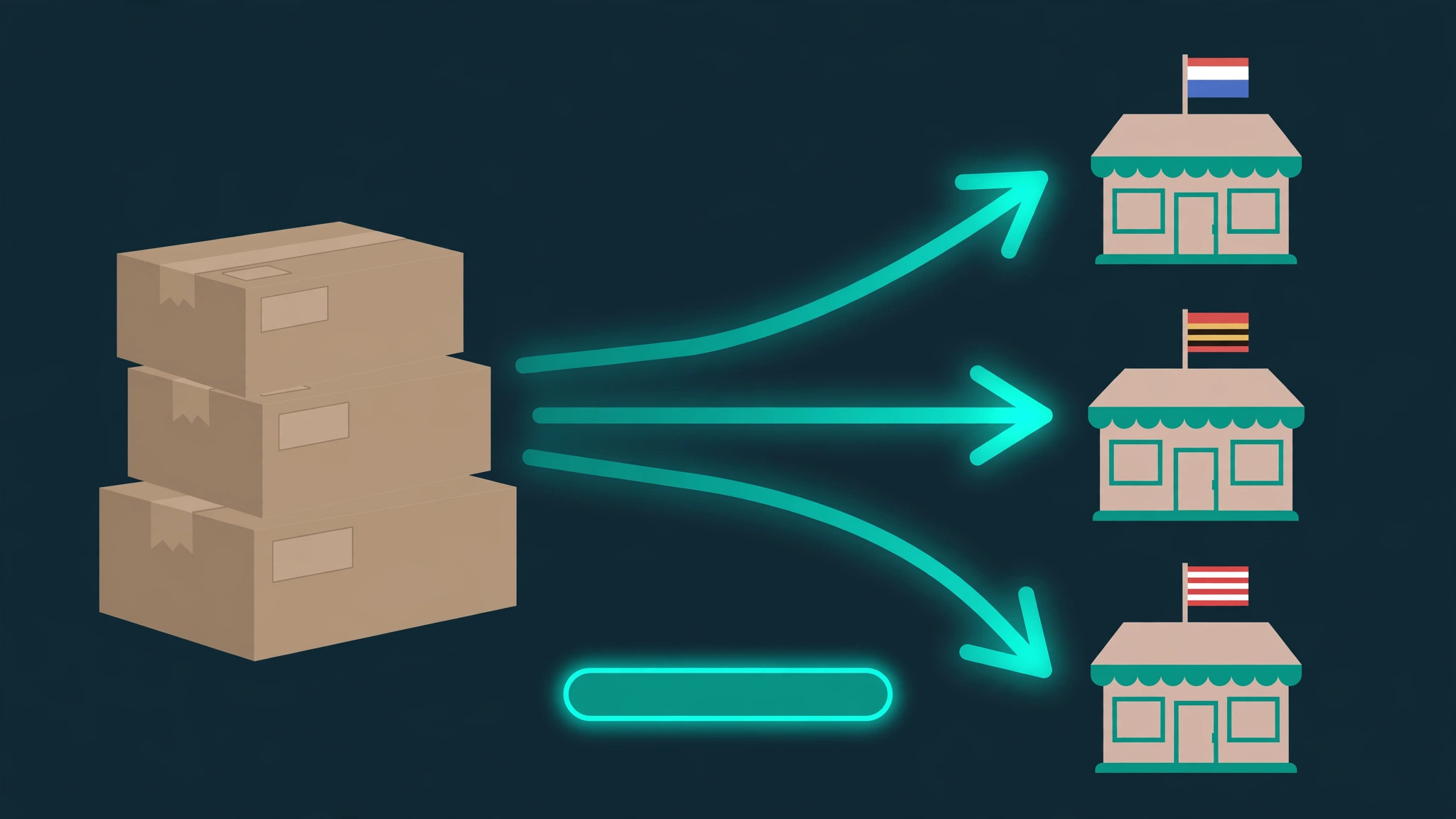
Urlzbit's Pro plan includes country-based routing: one short link, and each visitor is sent to the destination you configured for their country. For an Amazon affiliate, the setup looks like this:
- Your .com link with your US tracking tag becomes the destination for US visitors.
- Your .co.uk link with your UK tracking tag becomes the destination for UK visitors.
- Your .de link with your German tracking tag becomes the destination for German visitors.
- Every other country falls back to a default destination you choose — usually your largest market's link, or your website.
Because the routing happens when the short link is clicked — before Amazon is involved — it works identically in a tweet, a video description, a QR code, or a text message. Each destination is a fully tagged URL from the correct country's Associates programme, so the tag= parameter for that storefront survives intact and the click is attributable.
Shorter links also get clicked more in character-limited placements, custom endings make your links recognizable across platforms, and Urlzbit's click analytics show which countries your buyers actually come from — data amzn.to never gives you. Country routing is a Pro feature; single-store shortening, custom endings, QR codes, password protection, and link scheduling are all available on the free plan (100 saved links, 10,000 clicks per calendar month).
If you are already using country routing for non-Amazon links, the mechanics are the same ones described in How to Redirect a Link Based on Country with Urlzbit.
What geo-routing can't do: read this before you build
Honesty box, because this is where competing tools oversell:
- Urlzbit routing sends each click to the destination you configured for that country. It does not automatically find the same product (the same ASIN) in another country's Amazon store, and it does not automatically attach local affiliate tags. You must paste the correct product URL — with your own tag for that storefront's Associates programme — as each country's destination.
- You still need to join each country's Associates programme separately. Routing only delivers the right tagged link; it cannot register you in the UK or German programmes.
- Routing is not deep-linking into the Amazon app. A routed click opens the product page in the browser; it does not force the Amazon app open. Do not promise app deep-links to your audience.
- Prices and availability differ by store. The same ASIN may cost more, cost less, or be unavailable in another country's store. Routing fixes the destination, not the catalogue.
FAQ
Can I use Bitly or another shortener for Amazon affiliate links?
The policy answer is the same as for any third-party shortener: allowed as long as it is clear the link goes to Amazon, the referrer is preserved, and your tag survives. The practical answer depends on features: basic shorteners give you shortening and analytics, but country routing is the feature that matters for international audiences, and it is typically gated behind paid tiers.
Will shortening my Amazon link hurt my commissions?
Shortening itself does not change the commission. What changes it: losing your tag parameter in the process, obscuring the Amazon destination (policy violation), or stripping the referrer through chained redirects. Verify the final destination and tag of every shortened link before publishing.
How do I shorten many Amazon links at once?
If you maintain product lists, gift guides, or comparison tables, shortening links one by one does not scale. Urlzbit Pro's bulk tools — paste up to 20 URLs at once or import up to 100 rows from a CSV — were built for exactly this, as described in Bulk URL Shortener: Shorten 100 Links at Once. Remember: bulk creation only saves you time if every pasted URL already carries the correct tag.
Do I need a separate Associates account for each Amazon country?
Yes. Each country's programme issues its own tracking ID, and a tag from one storefront earns nothing on another. Register in every country whose traffic you want to monetize, then use one geo-routed short link to send each visitor to the right storefront.
The short version
Shorten Amazon links three ways — hand-trimmed URLs, SiteStripe's amzn.to, or a third-party shortener — but always start from a tagged link and never use a.co links for affiliate traffic. Amazon allows shorteners as long as the Amazon destination stays clear and the referrer is preserved. The real commission killer for growing affiliates is not shortening at all: it is sending international visitors to the wrong country's store. One geo-routed short link per product fixes that, as long as you supply the correctly tagged URL for each storefront yourself.
Next step: Try shortening your first link free — and if your audience spans countries, see Pro's routing plans.